 Simrita Mishra
As Kubernetes‘ environments scale, controlling service-to-service and north-south traffic becomes increasingly critical. When traffic spikes unexpectedly or clients overwhelm APIs, applications can fail, latency can increase, and cascading outages can occur.
This is where Rate Limiting in Istio Ambient Mesh becomes essential. With Ambient Mode simplifying service mesh architecture and Envoy Gateway enabling Layer 7 traffic enforcement, organizations can implement scalable and efficient rate limiting without relying on sidecars.
In this blog, we’ll explore how Rate Limiting works in Istio Ambient Mesh, understand its architecture, configure policies, and apply production best practices.
Video on Envoy Rate Limiting with Istio Ambient Mesh
In case you want to refer to the video, then here it is
What is Rate Limiting?
Rate limiting as the name suggests is a way of limiting the number of requests an application receives. Now, why do we even need to limit the requests to an application? right? because an overwhelming amount of traffic to an application can cause the application to fail or hang resulting in loss of resources.
Types of Rate Limiting
There are two types of Rate Limiting.
- Local Rate Limiting
- Global Rate Limiting
Local Rate Limiting
Local rate limiting enforces requests limit to each Envoy sidecar or gateway controls the rate independently for its own traffic. It uses the Token Bucket Algorithm to ensure that the local rate limiting conditions are met. Local rate limiting helps in applying fine-grained security to the pods/services.
Global Rate Limiting
Global rate limiting in Istio is a traffic control method applied to a service mesh, ensuring that request limits are shared across all service instances rather than being applied individually to each. This prevents overload on services by capping total requests allowed globally, regardless of how many replicas of a service exist.
It has mainly 3 components:
- Envoy Proxy (Waypoint) – This is where requests first arrive. The waypoint needs to ask: ‘Should I allow this request?’
- Rate Limit Service – This is the brain. It receives rate limit checks from Envoy, evaluates them against configured rules, and says ‘yes, allow it’ or ‘no, deny it’
- Redis – This is the memory. It stores the counters – how many requests have been made, when they expire, etc. Redis is fast and perfect for this use case.
Now, let’s move to the architecture section.
Local Rate Limiting Architecture
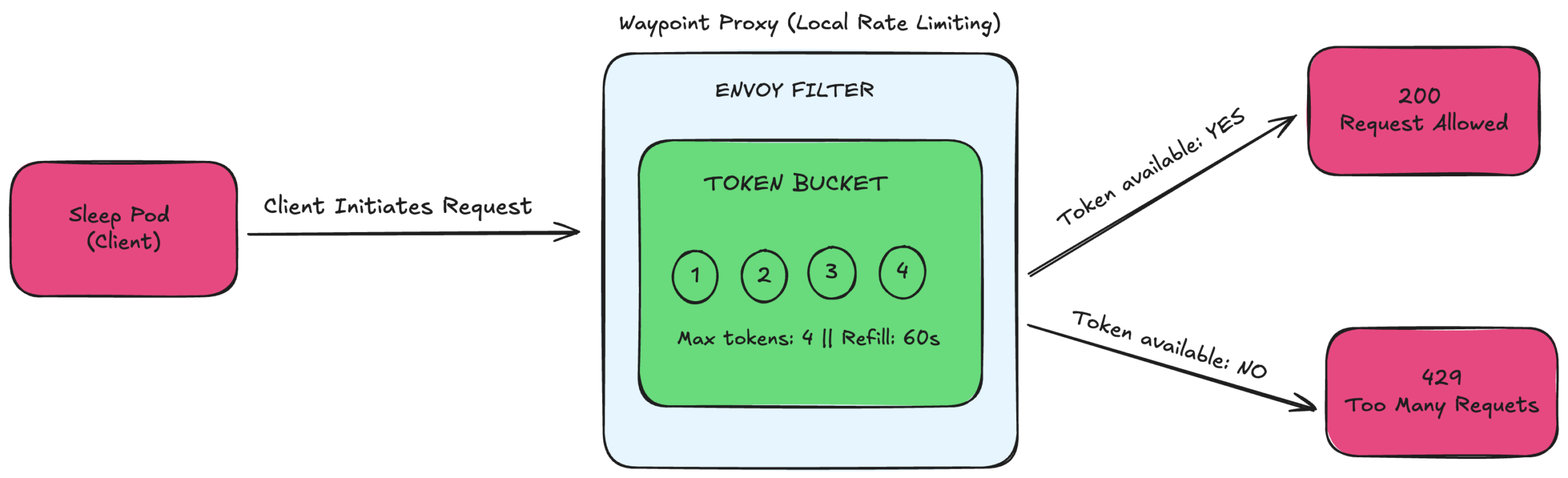
FIG A: Local Rate Limiting Architecture
Architecture Flow
Client → Waypoint Proxy (Token Bucket) → Decision → Allow / Deny
- A client sends a request to your service.
- The request reaches the Waypoint Proxy (Layer 7 enforcement point in Ambient Mode).
- Envoy checks the local token bucket.
- The request is either allowed or rejected.
How It Works
In Istio Ambient Mesh, local rate limiting is enforced at the Waypoint Proxy using Envoy’s built-in token bucket algorithm.
When a client sends a request to a service inside the mesh, the traffic is routed through the Waypoint Proxy, which acts as the Layer 7 enforcement point. Before the request reaches the backend service, Envoy checks its local token bucket.
The token bucket is configured with a maximum capacity (for example, 4 tokens) and a refill rate (for example, 4 tokens every 60 seconds). Each incoming request consumes one token from the bucket. If a token is available, the proxy forwards the request to the backend service, and the client receives a successful response (200 OK). If the bucket is empty, the proxy immediately rejects the request and returns an HTTP 429 (Too Many Requests) response. Tokens are automatically replenished at the configured interval, allowing new requests once capacity is restored.
Because this is local rate limiting, each Waypoint Proxy replica maintains its own independent token bucket. For instance, if the limit is set to 4 requests per minute and there are 3 proxy replicas, the effective total capacity across the cluster becomes 12 requests per minute. The enforcement is per proxy, not centrally coordinated.
The token bucket algorithm allows controlled traffic bursts up to the bucket’s maximum capacity while maintaining a steady request rate over time. This makes local rate limiting in Istio Ambient Mesh fast, lightweight, and highly scalable, though not globally synchronized across replicas.
Global Rate Limiting Architecture
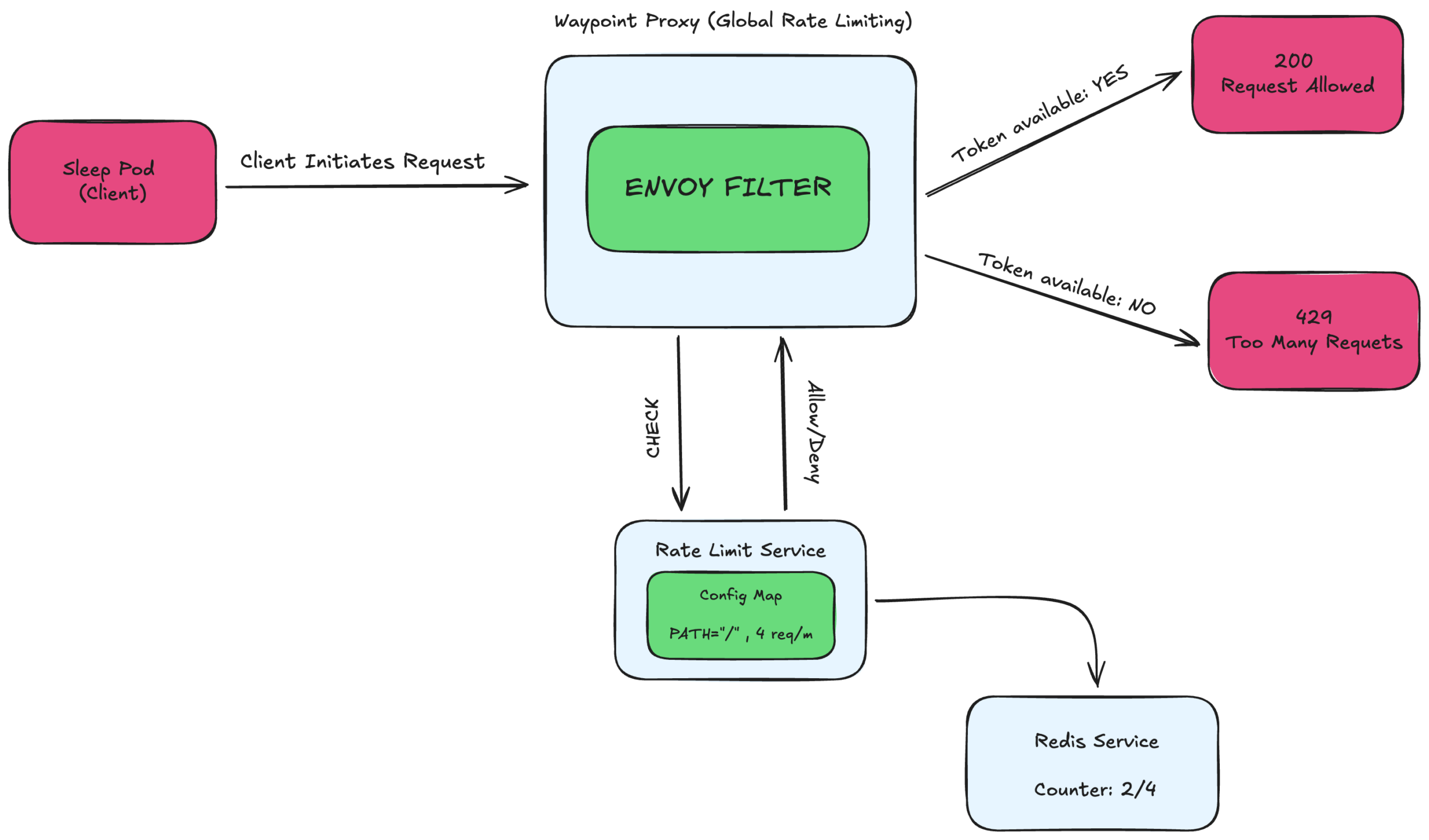
FIG B: Global Rate Limiting Architecture
Architecture Flow
Client → Waypoint Proxy → Rate Limit Service → Redis → Decision Engine → Allow / Deny
Here’s how the request lifecycle works inside Istio Ambient Mesh:
- A client sends a request to your Kubernetes service.
- The request is routed through the Waypoint Proxy (Layer 7 enforcement point in Ambient Mode).
- The Waypoint Proxy sends a gRPC request to the external Rate Limit Service (typically on port 8081) with request details (for example, PATH=”/”).
- The Rate Limit Service evaluates its configured rules and queries Redis, which maintains the shared rate limit counter.
- Based on the Redis counter value, a centralized decision is made to allow or reject the request.
- The Waypoint Proxy enforces the decision and either forwards the request to the backend service or returns HTTP 429 (Too Many Requests) to the client.
How It Works
In Global Rate Limiting in Istio Ambient Mesh, the decision-making process is centralized rather than handled locally by each proxy.
When a client sends a request to a service inside the mesh, the request first reaches the Waypoint Proxy, which acts as the Layer 7 enforcement point in Ambient Mode. Unlike local rate limiting, the Waypoint Proxy does not decide immediately whether to allow or reject the request. Instead, it sends a gRPC call to an external Rate Limit Service (typically running on port 8081). This request includes attributes such as the request path (for example, PATH=”/”) or other policy-matching details.
The Rate Limit Service evaluates the request against its configured rules (usually defined in a Config Map). To determine whether the request should be allowed, it queries Redis, which maintains the shared rate limit counters for the entire cluster.
Redis stores a centralized counter — for example, “2 out of 4 requests used.”
If the defined limit has not been exceeded, the Rate Limit Service responds with Allow.
If the limit has been reached, it responds with Deny.
The Waypoint Proxy then enforces the returned decision:
- If allowed → the request is forwarded to the backend service and the client receives 200 OK
- If denied → the proxy immediately returns HTTP 429 (Too Many Requests)
The key architectural principle behind global rate limiting is the shared cluster-wide counter. All Waypoint Proxy replicas consult the same Redis-backed counter. For example, if the configured limit is 4 requests per minute and there are 3 proxy replicas, the effective cluster-wide capacity remains 4 requests per minute total, not 12. The limit is not multiplied by the number of replicas.
Because every proxy relies on the same centralized Redis counter, enforcement is globally synchronized. This makes global rate limiting ideal for multi-replica Kubernetes deployments, API quotas, tenant-level enforcement, and enterprise-grade traffic governance.
Now, let’s move to the demo prerequisites
Demo Prerequisites
For this demo, we are using:
- AWS EKS
- Kubernetes version 1.34
- Istio with Ambient Mesh enabled
The goal is to deploy:
- A simple httpbin service in the default namespace
- A Waypoint Proxy that will enforce rate limiting
Install Istio with Ambient Profile
First, download and install Istio

Install Istio using the Ambient profile

This installs Istio with Ambient Mesh components, including ztunnel.
Install Gateway API CRDs
Ensure the Kubernetes Gateway API CRDs are installed
kubectl get crd gateways.gateway.networking.k8s.io &> /dev/null ||
kubectl apply –server-side -f https://github.com/kubernetes-sigs/gateway-api/releases/download/v1.4.0/experimental-install.yaml
This enables Gateway and Waypoint resources required for Layer 7 policy enforcement.
Enable Ambient Mode for the Namespace
Label the default namespace to enable Ambient data plane mode

This ensures workloads in the namespace to participate in Istio Ambient Mesh.
Deploy the Waypoint Proxy
Apply a Waypoint Proxy to enforce Layer 7 policies such as rate limiting

This creates and attaches a Waypoint Proxy to the default namespace.
At this stage:
- Ambient Mesh is enabled
- The namespace is enrolled
- The Waypoint Proxy is active
- You are ready to configure Local or Global Rate Limiting
Demo on Local and Global Rate Limiting in Istio Ambient Mesh
In this section, we demonstrate both Local Rate Limiting and Global Rate Limiting inside Istio Ambient Mesh using Envoy Gateway.
Understanding the difference between these two approaches is important when designing production-grade traffic policies.
Local Rate Limiting (Per-Proxy Enforcement)
Local rate limiting is enforced directly inside the Envoy proxy (Gateway or Waypoint). Each proxy instance maintains its own counters and applies limits independently.
In this demo, we will see
- A rate limit policy is applied at the Envoy layer.
- The limit is configured (for example, 5 requests per 10 seconds).
- When traffic exceeds the defined threshold:
- Envoy immediately responds with HTTP 429 (Too Many Requests).
- No external service is contacted.
- The rate limit resets after the defined time window.
Key Characteristics of Local Rate Limiting
- Fast enforcement (no external calls)
- Simple to configure
- No centralized coordination
- Limits apply per proxy instance
- Suitable for lightweight protection and edge-level throttling
Local rate limiting works well when you need basic protection without shared cluster-wide limits.
YAML Example
Below is an example configuration for Local Rate Limiting in Istio Ambient Mesh using an Envoy Filter attached to a Waypoint or Gateway.
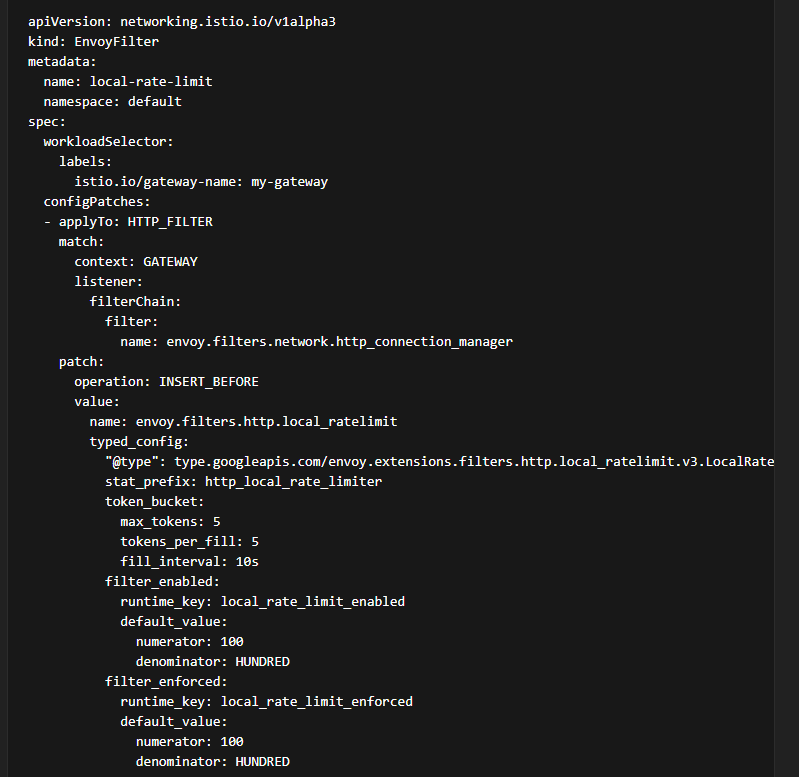
What This Configuration Does
- Limits traffic to 5 requests per 10 seconds
- Enforces rate limiting at the Envoy proxy level
- Returns HTTP 429 when limits are exceeded
- Applies specifically to the configured Gateway in Istio Ambient Mesh
This is ideal for simple, high-performance rate limiting in Kubernetes.
Global Rate Limiting (Centralized Enforcement)
Global rate limiting uses an external rate limit service to maintain counters centrally across multiple Envoy instances.
In this demo:
- Envoy Gateway is configured to communicate with an external rate limit service.
- Requests are evaluated against a centralized counter.
- The rate limit is enforced consistently across all replicas and nodes.
- When the limit is exceeded the external rate limit service instructs Envoy to reject the request.
- The client receives HTTP 429.
Key Characteristics of Global Rate Limiting:
- Cluster-wide consistent limits
- Shared counters across multiple pods and gateways
- Ideal for multi-replica or multi-tenant environments
- Better suited for production-grade API governance
Global rate limiting is essential when traffic is distributed across multiple Envoy proxies, and you require uniform enforcement.
YAML Example
First, define Rate Limit Service and Redis for the counter
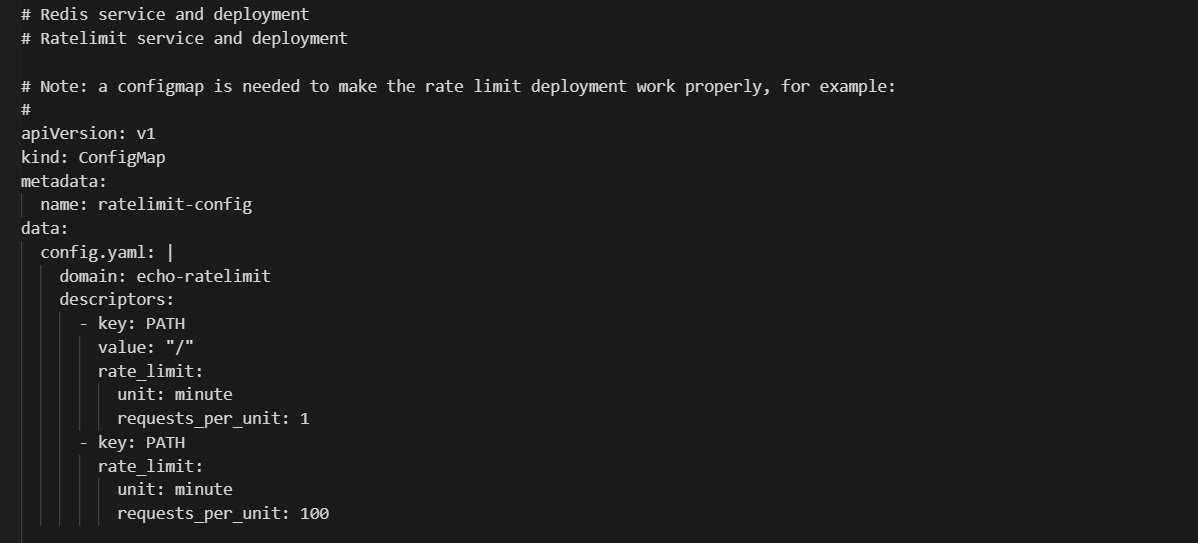
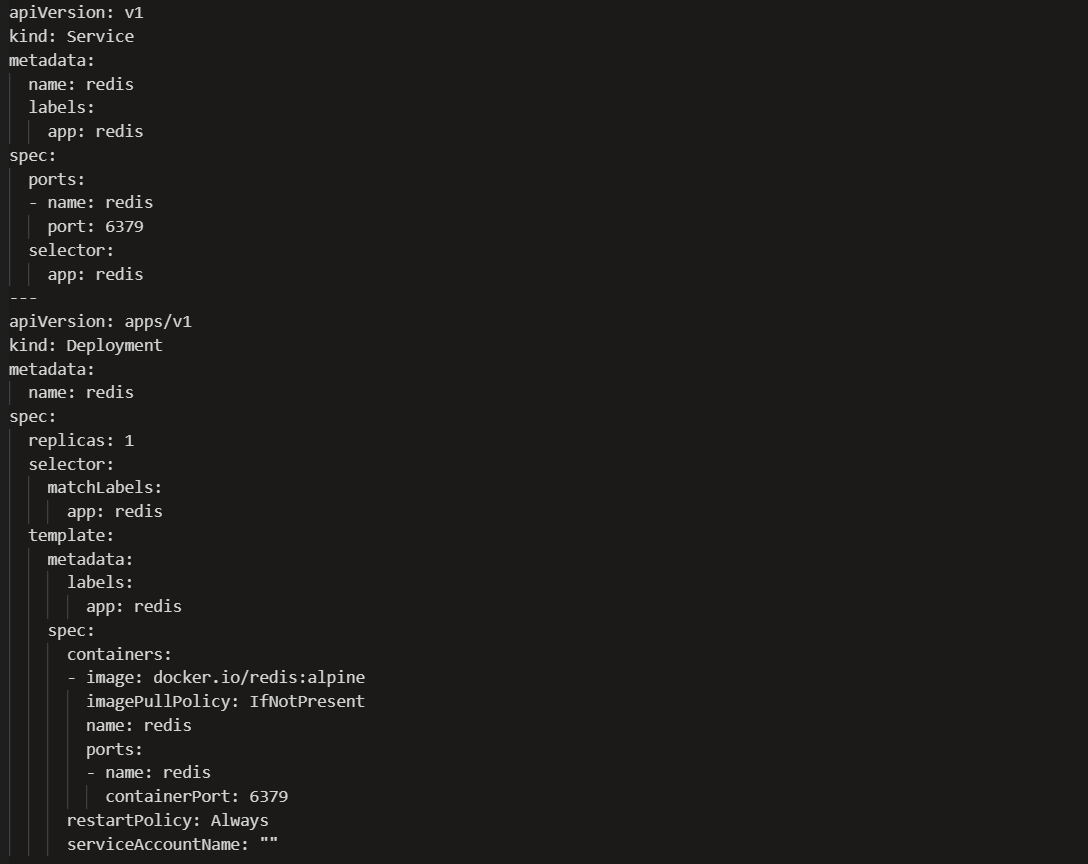
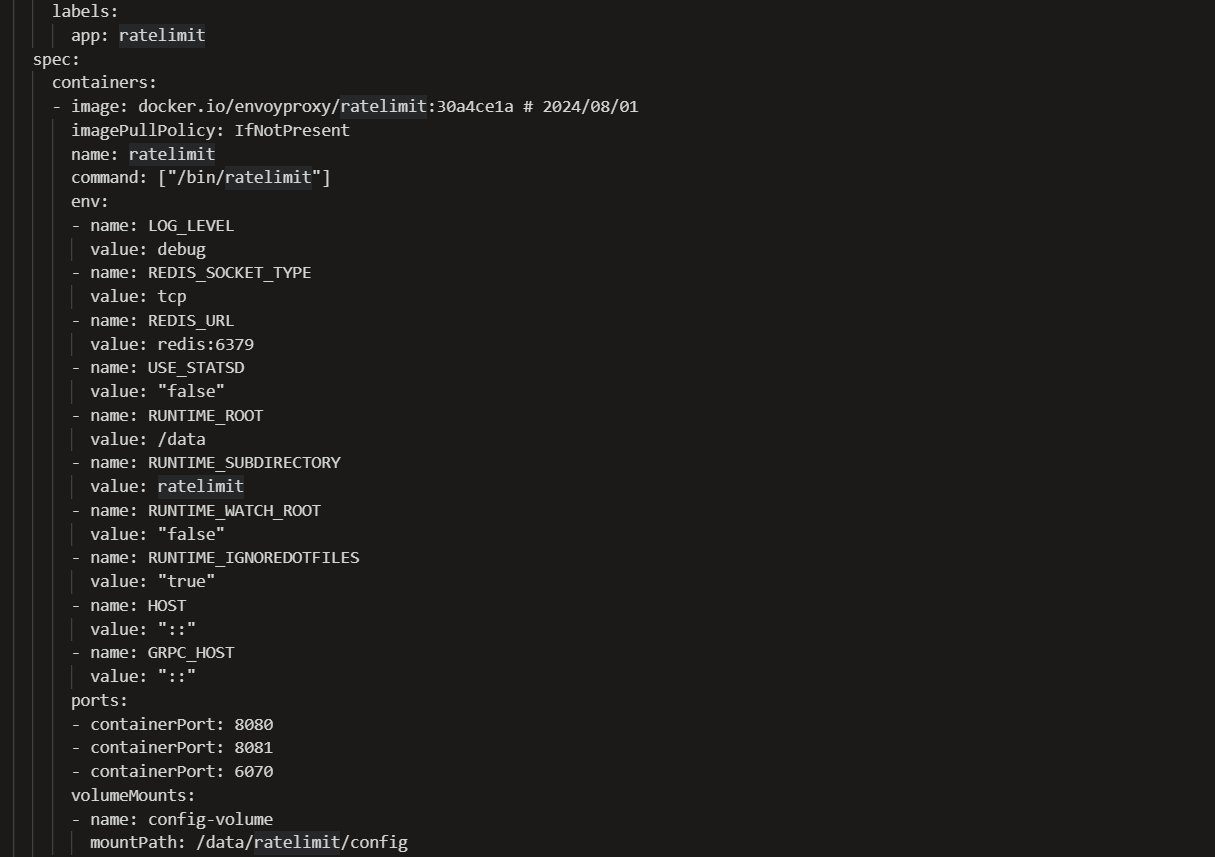

Next, Global Rate limit filter (Example)
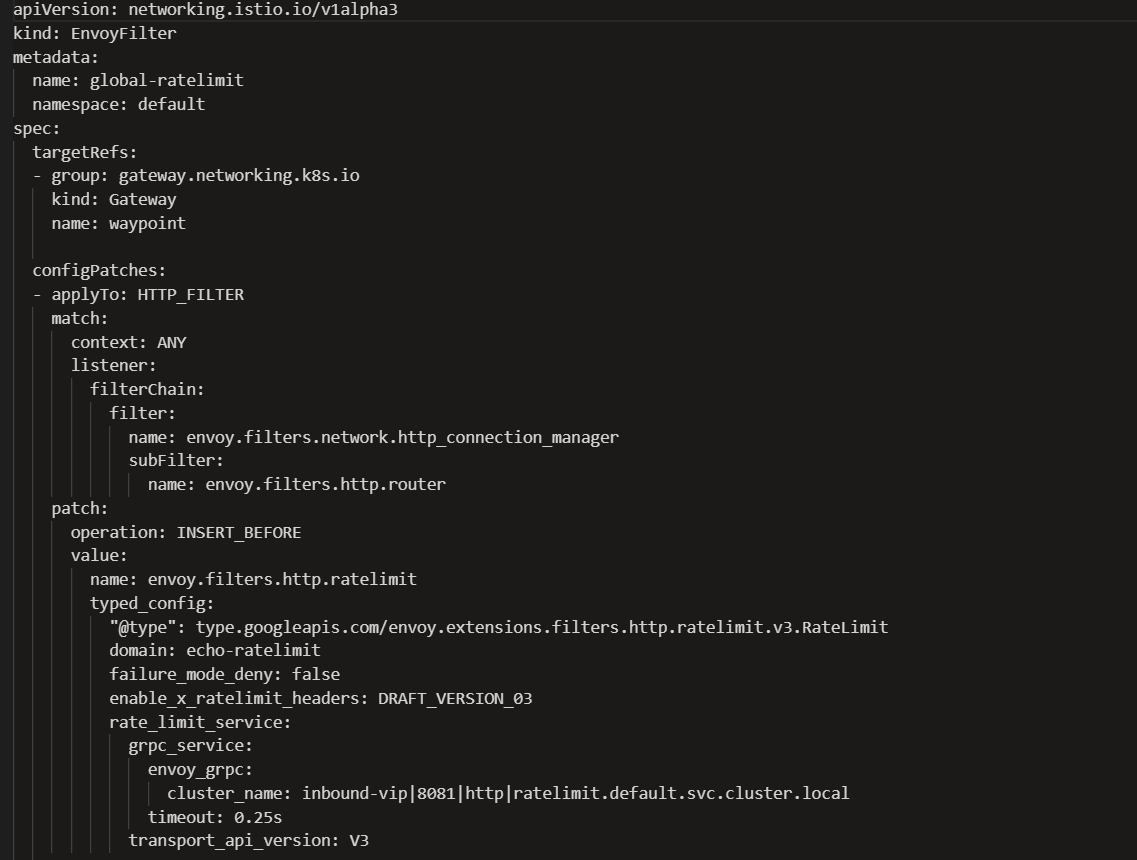
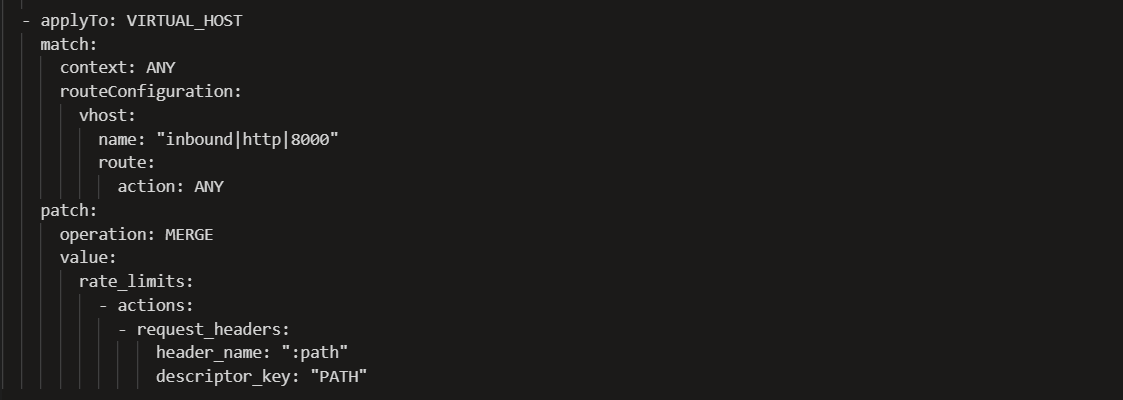
What This Global Configuration Does
- Enforces 100 requests per minute cluster-wide
- Applies limits consistently across all Envoy replicas
- Centralizes counters for production-grade enforcement
- Enables scalable API governance in Istio Ambient Mesh
Final Thoughts
Implementing rate limiting in Istio Ambient Mesh is essential for securing microservices, controlling Kubernetes traffic, and preventing backend overload. Whether using local token bucket enforcement at the Waypoint Proxy or centralized global rate limiting with Redis, a well-designed strategy ensures reliable and scalable traffic governance.
If you’re running Istio Ambient Mesh in production, having the right architecture and support model is critical.
IMESH provides enterprise-grade Istio Ambient Mesh support, Envoy Gateway expertise, and production-ready Kubernetes guidance to help teams deploy, scale, and optimize service mesh environments with confidence.
For Ambient mesh support reach out to our experts