 Pooja Dhavale
The rapid growth of enterprise AI has pushed organizations beyond relying on a single Large Language Model (LLM) provider. Businesses are increasingly adopting multi-provider AI strategies to improve resilience, optimize costs, avoid vendor lock-in, and meet regional compliance requirements. However, this shift introduces an unexpected challenge every provider identifies the same model differently.
A model that works perfectly on one provider may require a completely different identifier on another, forcing development teams to update application code every time they switch to providers or add a new backend.
Fortunately, Envoy AI Gateway introduces Model Name Virtualization, a capability that removes this complexity by allowing applications to use a single logical model name while the gateway automatically translates it into the correct provider-specific model identifier.
In this blog, we’ll explore why model naming becomes a problem in multi-provider AI deployments, how Model Name Virtualization works, how to configure it using Envoy AI Gateway, and the production best practices platform teams should follow.
Video on Model Name Virtualization in Envoy AI Gateway
In case you want the video, here it is
Why Multi-Provider AI Becomes Complicated
Most applications begin by integrating with a single AI provider. During the initial stages, developers simply reference the provider’s model name in their application, and everything works as expected.
The challenge appears when organizations decide to adopt multiple AI providers.
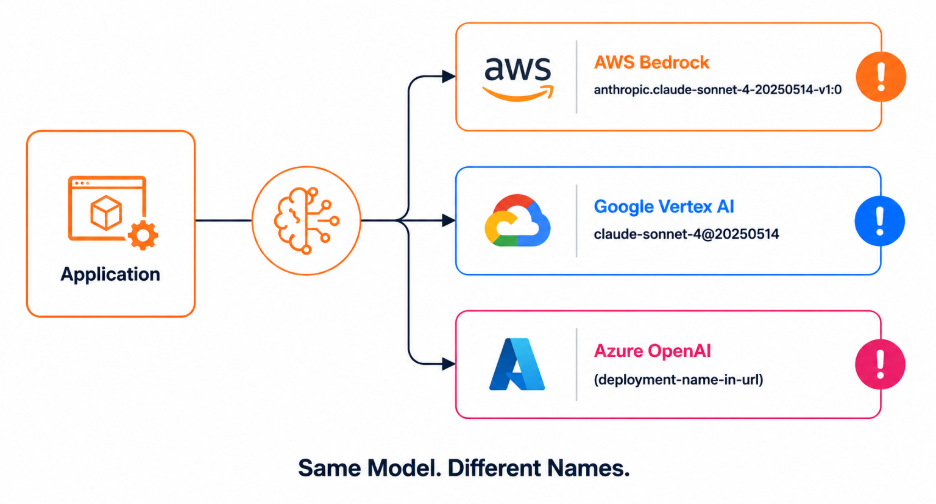
Although the underlying AI model may be identical, every provider exposes it differently.
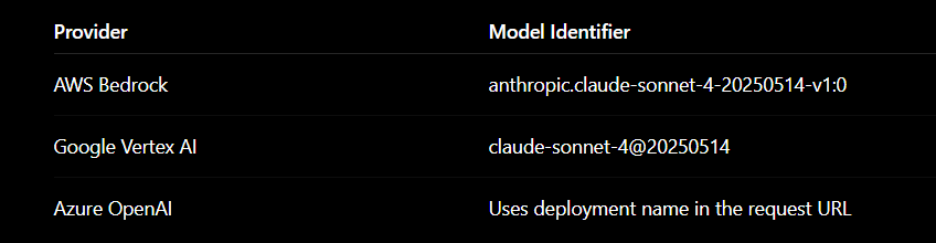
For example, an application built for AWS Bedrock cannot simply redirect traffic to Google Vertex AI because the model identifier changes completely.
This leads to several operational challenges:
- Application code becomes tightly coupled to individual providers.
- Every provider migration requires code changes and application redeployment.
- Multi-provider traffic routing becomes increasingly difficult.
- Platform teams spend more time managing provider-specific configurations instead of building reusable AI infrastructure.
- Vendor lock-in becomes harder to avoid.
As organizations scale AI adoption, these challenges quickly become operational bottlenecks.
This is exactly the problem that Model Name Virtualization solves.
What is Model Name Virtualization?
Model Name Virtualization is a feature in Envoy AI Gateway that introduces an abstraction layer between applications and AI providers.
Instead of applications knowing provider-specific model names, they simply use one logical or virtual model name.
For example:

The application continues using this virtual name regardless of which provider eventually processes the request.
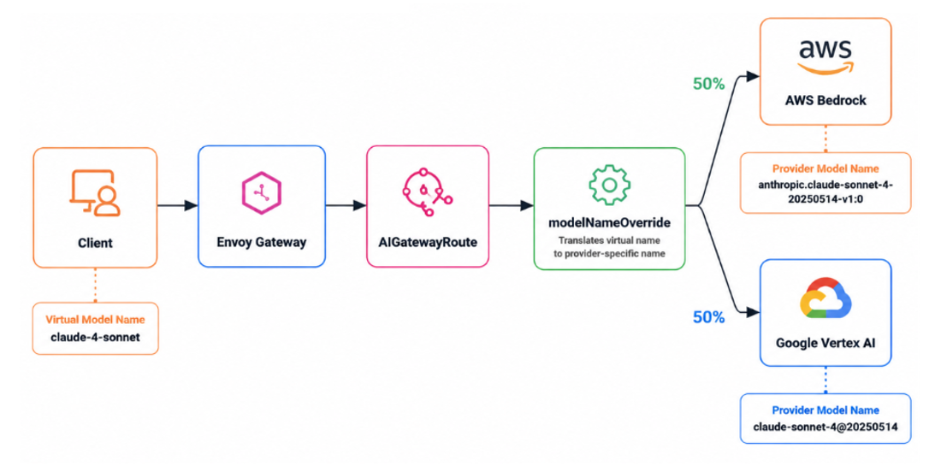
When the request reaches Envoy AI Gateway, the gateway automatically translates the virtual model name into the correct provider-specific identifier using the modelNameOverride configuration.
For AWS Bedrock, the request becomes:
 For Google Vertex AI, it becomes:

If Azure OpenAI is being used, the gateway routes the request using the configured deployment endpoint instead.
The application remains completely unaware of these translations.
This separation allows platform teams to manage provider-specific details centrally while application developers continue using a consistent API.
How Model Name Virtualization Works
The core of this capability is the modelNameOverride field configured inside an AIGatewayRoute.
The workflow is straightforward:
Step 1 – Client Sends a Request
The client sends a request using a virtual model name.

Step 2 – Envoy AI Gateway Matches the Route
Envoy AI Gateway matches the request using the configured route and identifies the appropriate backend services.
Step 3 – modelNameOverride Performs the Translation
Before forwarding the request, the gateway replaces the virtual model name with the provider-specific model identifier defined for that backend.
Step 4 – Traffic is Routed
Depending on the configured routing policy, requests can be:
- Sent to AWS Bedrock
- Sent to Google Vertex AI
- Split between both providers
- Used for provider fallback
Step 5 – Provider Returns the Response
Each provider receives the exact model name it expects, while the client continues interacting with a single logical model.
The entire translation process happens inside the gateway without requiring any application change
Architecture Overview
Model Name Virtualization is implemented through several Envoy AI Gateway components working together.
The request first enters Envoy Gateway, which acts as the central entry point for AI traffic.
The gateway forwards the request to an AIGatewayRoute, where routing rules and model translations are evaluated.
Using modelNameOverride, the gateway replaces the virtual model name with the provider-specific identifier configured for each backend.
Finally, the request is forwarded to one of the configured AI Service Backends, which can represent AWS Bedrock, Google Vertex AI, Azure OpenAI, or any supported provider.
Because the translation happens entirely inside the gateway, applications never need to know which provider ultimately serves the request.
Configuration Walkthrough
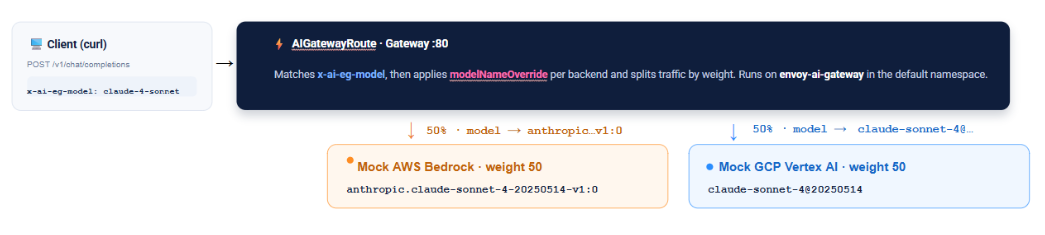
The demonstration consists of seven Kubernetes configuration files that work together to enable Model Name Virtualization.
gatewayclass.yaml
Registers the Envoy AI Gateway controller with Kubernetes.
gateway.yaml
Creates the HTTP listener that accepts incoming AI traffic.
aigatewayroute.yaml
It is the most important configuration file.
It defines routing rules, traffic weights, and the modelNameOverride mapping for each backend.
aiservicebackends.yaml
Defines the AI providers participating in the deployment while maintaining a consistent OpenAI request schema.
backends.yaml
Maps backend definitions to Kubernetes services and provider endpoints.
mock-backends-deploy.yaml
Deploys mock AWS Bedrock and Google Vertex AI services used during the demonstration.
backendtrafficpolicy.yaml
Defines retry policies for HTTP 429, 500, and 503 responses, improving resilience during provider failures.
Together, these seven resources demonstrate how a single virtual model name can be translated into multiple provider-specific identifiers while keeping the application unchanged.
Production Best Practices
As organizations expand their AI infrastructure across multiple providers, a few best practices can help ensure reliable deployments:
- Always configure modelNameOverride for every provider backend.
- Use a consistent request schema across all AI providers.
- Validate provider-specific model names before production rollout.
- Start with weighted traffic splitting (such as 90/10) before moving to a 50/50 distribution.
- Combine Model Name Virtualization with Provider Fallback to improve availability during provider outages.
- Monitor gateway metrics and logs to verify model translation and routing behavior.
Following these practices helps maintain predictable routing and simplifies future provider migrations.
Final Thoughts
As enterprises embrace multi-provider AI strategies, managing provider-specific model names can quickly become a source of complexity. Model Name Virtualization in Envoy AI Gateway solves this challenge by introducing a single logical model name that the gateway automatically translates into the correct provider-specific identifier.
Whether you’re splitting traffic across providers, preparing for future migrations, or building a resilient AI platform, Model Name Virtualization allows applications to remain provider-agnostic while platform teams retain full control over routing and model translation.
At IMESH, we help organizations deploy and operate Envoy AI Gateway in production with enterprise-grade support, architecture guidance, troubleshooting, and best practices for building secure, scalable, and resilient AI infrastructure.
Ready to simplify multi-provider AI deployments?
Connect with the IMESH experts and accelerate your Envoy AI Gateway journey.